Best WordPress Themes for Travel Blogs (Free & Paid, 2026)
On this page
I get this question every single week, so here’s the straight answer: the best WordPress theme for a travel blog in 2026 is a fast, general-purpose theme with a travel starter template… not a “travel theme” with a slider on the homepage. My default is Kadence (free), with Astra, GeneratePress and Blocksy as equally good picks depending on taste. All four load in well under a second on cheap hosting, play nicely with the block editor, and have one-click demo imports that give you a finished-looking blog before lunch. Want a purpose-built travel look? Blossom Travel is the free travel-specific theme I’d actually install. Below you’ll find the full comparison, what “fast” means in real numbers, and how to set up your theme in an afternoon.
Key takeaways
- Grab a lightweight multipurpose theme (Kadence, Astra, GeneratePress, Blocksy, Neve) and slap a travel starter template on it. That beats 95% of themes sold as “travel themes.”
- The free versions are plenty for year one. Pro upgrades run roughly $59–$99/year and mostly buy you layout controls, not speed.
- Speed is a design decision. Your theme, your images and your plugins decide Core Web Vitals, and Google measures them on real phones, not your laptop.
- Steer clear of themes that need a page builder, ship a full-screen slider, or were last updated more than a year ago.
- Twenty Twenty-Five, WordPress’s default block theme, is a proper option if you want zero dependencies and full Site Editor control.
- Choose once. Switching themes after 50 posts is a whole weekend of fixing spacing and featured images. Ask me how I know.
This is step five of my seven-step guide to starting a travel blog. I’m assuming you’ve already installed WordPress and you’re staring at a default theme wondering why your blog doesn’t look like the ones you admire. That gap? It’s a theme, a few settings and about three hours. Let’s close it.
What makes a good WordPress theme for a travel blog?
Travel blogs are photo-heavy, read mostly on phones, and live or die by Google and Pinterest traffic. That gives you a concrete checklist, no guesswork needed. A theme is a good fit when it:
- Loads fast on a phone with nothing else installed. The theme’s own CSS and JavaScript should come in under about 100KB combined. Kadence, Astra, GeneratePress and Blocksy all pass; most themes on marketplaces don’t come close.
- Works natively with the block editor. In 2026 the block editor IS WordPress. If a theme demands Elementor, WPBakery or its own builder to look like the demo, the demo is a trap.
- Has a proper single-post layout: wide featured image, readable 17–19px body text, a sidebar you can switch off, an author box, and related posts.
- Handles category archives well, because “Japan,” “Budget travel” and “Packing lists” pages are how people actually browse a travel blog.
- Is actively maintained (updated within the last few months on wordpress.org) with a support forum where people get answers.
- Has starter templates you can import in one click, so you start with a finished structure and swap in your own words and photos.
Notice what’s NOT on that list: parallax, sliders, video backgrounds, “interactive maps,” animated counters. Every one of those costs you loading time, and not one of them keeps a reader on your Vietnam itinerary post a second longer. Good photos and clear writing do that. Nothing else.
Best WordPress themes for travel blogs compared (2026)
Every theme below is on wordpress.org, was updated in 2026, and I’ve either built on it or audited sites running it. Prices are the entry-level Pro tier as listed on each developer’s site when I checked; they change and run sales constantly, so treat them as a range and check the current price before you pull out a card.
| Theme | Price | Speed (theme weight) | Block editor support | Demo import | Best for |
|---|---|---|---|---|---|
| Kadence | Free; Pro bundles from around $99/yr | Very light (~50–70KB CSS+JS) | Excellent; Kadence Blocks add-on | Yes, 1-click starter templates incl. travel | My default for beginners |
| Astra | Free; Pro from around $59/yr | Very light (~50KB) | Excellent; Spectra blocks | Yes, 200+ starter templates incl. travel | Most templates to choose from |
| GeneratePress | Free; Premium $59/yr | Lightest (~30KB) | Excellent; GenerateBlocks | Yes (Premium only) | People who want minimal and fast |
| Blocksy | Free; Pro from around $69/yr | Light (~60–80KB) | Excellent; header/footer builder in free | Yes, starter sites incl. travel | Most design control for free |
| Neve | Free; Pro from around $69/yr | Light | Very good; Otter blocks | Yes, incl. travel blog demo | Clean, simple, ThemeIsle support |
| Twenty Twenty-Five | Free (default theme) | Very light | Native block theme, Site Editor | Style variations, no full demo | Zero dependencies, full control |
| Blossom Travel | Free; Pro available | Moderate | Good (Customizer-based) | Yes, demo importer | Ready-made travel look |
| Travel Eye (WEN Themes) | Free | Moderate | Classic theme, uses SiteOrigin builder | Yes | Tour-operator style sites |
Eyes glazing over? Fine. Install Kadence, import the travel starter template, and go write. You won’t regret it. The rest of this section is for people who enjoy choosing… and I say that with love, because I’m one of them.
Kadence: the one I install for clients
Kadence nails the fundamentals in the free version: a drag-and-drop header builder, a transparent header option for a big hero photo, global colors and fonts you set once and forget, and a post layout with a real author box. The free Kadence Starter Templates plugin includes several travel and outdoor designs that import in one click with sample posts you overwrite. Its companion Kadence Blocks plugin adds a row layout, an advanced gallery and a table of contents block, which covers pretty much everything a travel blogger needs without touching a page builder. Kadence is now owned by Liquid Web (StellarWP), so the pricing pages have moved around; the free theme is still on wordpress.org and still updated regularly.
Astra: the most starter templates
Astra is the most-installed non-default theme on wordpress.org and has the biggest template library of the lot. Its free starter templates include multiple travel blog and travel agency designs, and its Spectra blocks plugin gets on fine with the block editor. The free theme is light. Where Astra lets itself down is the upsell noise in the dashboard and the pile of “Astra Pro + AI” bundles on the pricing page. Ignore the AI bundles. If you do buy, the single-site Pro at around $59/year is plenty.
GeneratePress: the lightest of all
GeneratePress is what I reach for when speed is the whole brief. The free theme is about 30KB and does nothing you didn’t ask for. So what’s the catch? For beginners, the free version is deliberately plain and the site library (demo imports) needs GP Premium at $59/year. If you’re happy to pay $59 once and build from a template, it’s superb. If you want a designed look for free, Kadence or Blocksy will get you there faster.
Blocksy: most design control without paying a penny
Blocksy’s free version includes a header and footer builder, a color palette system, and card-style blog layouts that make travel photography look brilliant. Its starter sites include travel designs. It’s a bit heavier than GeneratePress and its Customizer has loads of options, which can turn into a rabbit hole. Pick it if you enjoy tinkering with design and want that control for free.
Neve and Twenty Twenty-Five
Neve, from ThemeIsle, is a clean lightweight theme with a travel blog demo and dependable updates; it’s a solid choice and I wouldn’t talk anyone out of it. Twenty Twenty-Five is the current WordPress default (WordPress 7.0, released in May 2026, didn’t ship a new default theme; the next one is planned for late 2026). It’s a full block theme, meaning you design headers, footers and templates in the Site Editor with no plugin at all. It’s the most future-proof option and completely dependency-free, but you build the look yourself from style variations and patterns rather than importing a finished demo. Some people love that. Most beginners don’t.
Travel-specific themes: Blossom Travel, Travel Eye and friends
Search “travel” on wordpress.org and you get over a thousand themes back. Most are thin variations churned out by a handful of theme shops. Two I’m comfortable naming: Blossom Travel by Blossom Themes (2,000+ active installs, updated in 2026, a genuine blogger-focused layout with a demo importer and a Pro version), and Travel Eye by WEN Themes (updated September 2026, more of a tour-company layout built on the SiteOrigin builder). Blossom Travel is the better fit for a personal travel blog. Both are heavier than the multipurpose themes above and lock you into their look more, which is why they’re my second choice rather than my first.
Free vs paid WordPress theme: do you really need Pro in year one?
No. Straight answer. I built most of the two hundred-plus sites in my portfolio on free themes, and the Pro upgrades I have bought were for client requests, not for speed or SEO. Here’s what your money actually buys with each of the main themes, so you can decide with your own eyes. Prices are approximate 2026 entry tiers; check the current price.
| Theme | Free version gives you | Pro adds (entry tier) | Worth it for a new travel blog? |
|---|---|---|---|
| Kadence | Header builder, global styles, starter templates, post layouts | Hooked elements, mega menu, infinite scroll, more header items (bundle ~$99/yr) | Not in year one |
| Astra | Layout controls, starter templates, Spectra blocks | Sticky header, blog Pro layouts, custom layouts, white label (~$59/yr) | Not in year one |
| GeneratePress | Bare, fast base theme | Site library (demo import), Elements, colors/typography modules ($59/yr) | Yes, if you choose GP; the free version is too plain to start from |
| Blocksy | Header/footer builder, palettes, card layouts, starter sites | Content blocks, mega menu, custom sidebars (~$69/yr) | Not in year one |
| Neve | Clean base, several demos | Blog booster, custom layouts, more header components (~$69/yr) | Not in year one |
| Blossom Travel | Full travel layout, demo import | More layouts, Instagram/newsletter sections, priority support | Only if you love the exact Pro demo |
Put that $59–$99 toward things that actually move a new blog: a year of hosting, a logo, or simply your time. My real breakdown of what a travel blog costs shows the theme is the easiest line to keep at zero. So keep it there.
How your theme affects speed, Core Web Vitals and SEO (the bit people skip)
Google measures three Core Web Vitals from real Chrome users: Largest Contentful Paint (how fast your main image or headline shows up; aim under 2.5 seconds), Interaction to Next Paint (how quickly the page responds to taps; aim under 200ms), and Cumulative Layout Shift (how much stuff jumps around; aim under 0.1). You’ll see your own numbers in Search Console once you have traffic, and you can test any page today at PageSpeed Insights.
Your theme influences all three, but it’s only one of three inputs. The diagram below is the mental model I give every client, and it usually ends the “which theme is fastest” conversation.
So here’s the practical bit: pick one of the light themes, then be disciplined about images (my guide to photos, sizing and speed for travel blogs has the exact export settings) and about plugins (see the only plugins a new travel blog needs). That combination on ordinary shared hosting scores 90+ on mobile without any heroics. A heavy theme with a slider, three font families and a page builder will struggle to hit 50 no matter how much caching you throw at it.
How to install and set up your travel blog theme (step by step)
I’m using Kadence as the example; the process is nearly identical for Astra, Blocksy and Neve. Here’s exactly where the buttons are.
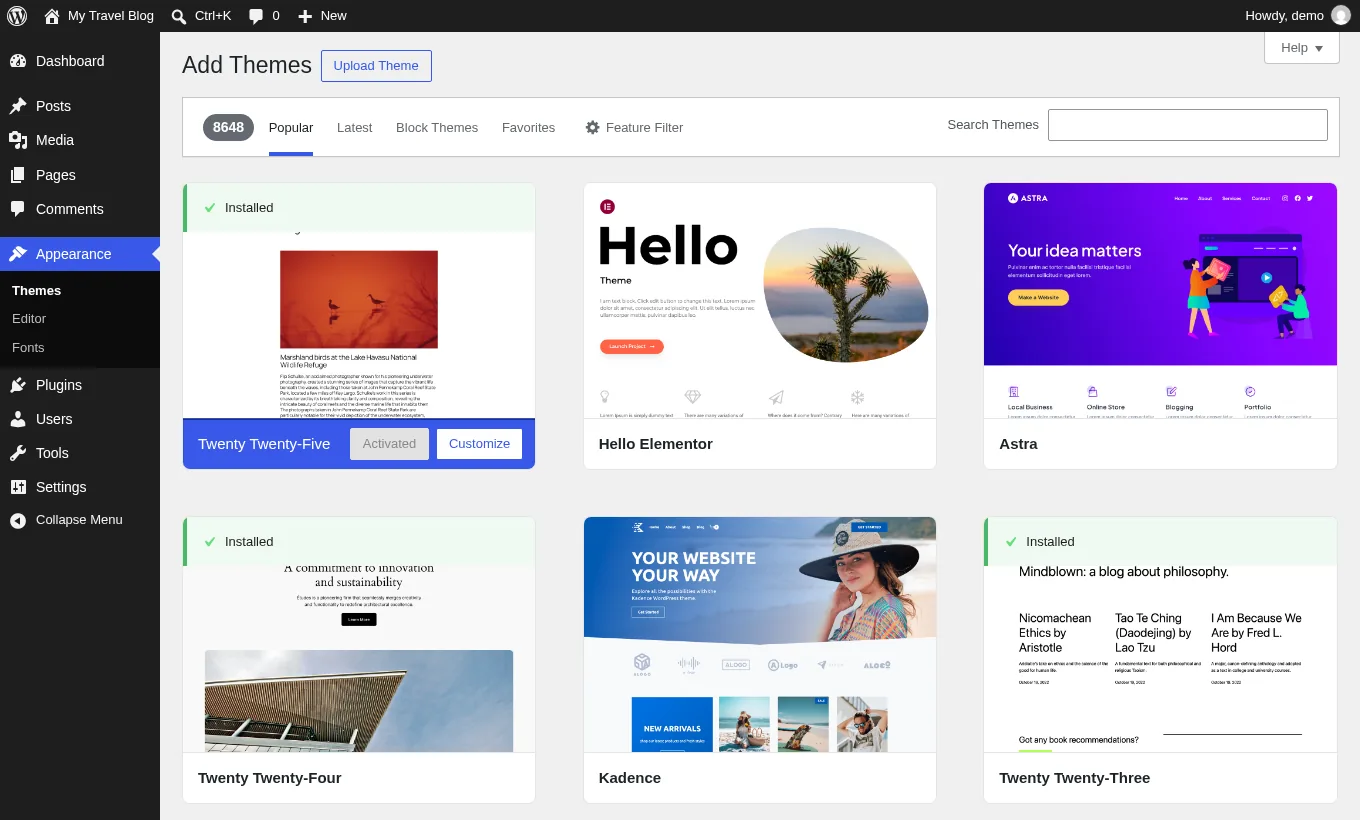
- Install the theme. In wp-admin go to Appearance → Themes → Add New Theme, search “Kadence,” click Install, then Activate.
- Install the starter templates plugin. Kadence will prompt you; if not, Plugins → Add New Plugin, search “Kadence Starter Templates,” install and activate. (Astra: “Starter Templates.” Blocksy: the Blocksy Companion plugin. Neve: the Otter/Templates Cloud prompt.)
- Pick a travel template. Appearance → Starter Templates, filter or search for “travel,” “adventure” or “outdoor.” Preview it on your phone by shrinking the browser window; the mobile view is the one that matters.
- Import with content. Choose the “full site” import, tick “import content,” and pick a color palette and font pairing on the same screen. Import takes one to three minutes. Go make a tea.
- Delete the demo posts once you’ve seen how they’re laid out. Keep one as a formatting reference until you’ve written three of your own.
- Set your identity. Appearance → Customize → Header → Logo: upload your logo (see how to do a travel blog logo on a $0–$50 budget) and a site icon (favicon) at 512×512.
- Set global colors and fonts. Customize → Colors and Customize → Typography. Two fonts maximum: one for headings, one for body. Body size 17–18px. Choose fonts marked “local” or use the theme’s option to host Google Fonts locally.
- Configure the single post layout. Customize → Blog Posts → Single Post: featured image above title or “wide,” show author box, show related posts, sidebar off (or right sidebar if you want an email signup living there).
- Fix the homepage and blog page. The import usually creates a Home page and sets it under Settings → Reading. Confirm the Posts page is your Blog page, then edit Home to swap out the demo text and photos.
- Build the menu. Appearance → Menus: Home, Destinations (category), Guides or Tips (category), About, Contact. Five items. Assign it to the Primary location.
- Test on your actual phone. Open a demo post, tap the menu, scroll, tap a link. Then run it through PageSpeed Insights before adding any plugins, so you know your baseline.
WordPress themes to avoid for a travel blog (and why)
I’m not going to name and shame individual products, because plenty of them are well-intentioned. But these are the patterns that predict pain, and I’ve seen every one of them on a client site.
- Marketplace “travel themes” that need a page builder. The demo was built in Elementor Pro or WPBakery, so your site needs those forever, and every page carries the builder’s CSS and JS. Switching away later means rebuilding every single page.
- Themes with a full-screen slider or video hero. A slider is three to five big images loading before your first word. It’s the fastest way to fail Largest Contentful Paint.
- Themes bundling ten “premium plugins.” Bundled plugins update late (or never), which is a security problem and a compatibility problem on every WordPress release.
- Anything last updated more than a year ago. On wordpress.org the “Last updated” date sits right on the theme page. Old themes throw warnings on PHP 8.3 and break with new block editor versions.
- Nulled or “GPL club” copies of Pro themes. Often modified with backdoors, and you get no updates. Can’t afford Pro? The free version is the answer. Always.
- Themes with their own SEO settings, sliders and forms built in. A theme should control how things look. Function belongs in plugins, so it survives a theme change.
Common mistakes when choosing a travel blog theme
- Judging by the homepage demo. Readers arrive from Google and Pinterest on single posts. Judge the post template.
- Judging on a laptop. Most travel blog traffic is mobile. Shrink the window or use your phone.
- Changing themes every month. Each switch resets widgets, menus and spacing, and can change image sizes. Pick, commit, write 30 posts, then reassess. Not before.
- Buying Pro before writing a post. Nothing in Pro brings readers. Content does.
- Importing a demo and never removing the placeholder text. I still find “Lorem ipsum” and stock photos of Santorini on live blogs. Google’s helpful-content expectations are all about first-hand experience; a demo shell is the exact opposite.
- Loading five font families because the Customizer lets you. Two. That’s it.
- Skipping the child theme when you edit code. If you ever add custom CSS beyond the Customizer’s Additional CSS box, use a child theme so updates don’t wipe your changes. Most beginners never need this, so don’t worry about it yet.
My recommendation, in one paragraph
Install Kadence, import a travel starter template, set two fonts and a three-color palette, turn on the author box and related posts, build a five-item menu, and STOP designing. Want an even lighter base and don’t mind paying $59? GeneratePress Premium. Want maximum control for free? Blocksy. Want a finished travel look with the least fiddling? Blossom Travel. Any of these on a decent host (my hosting recommendations for travel blogs) will pass Core Web Vitals once your images are sized properly. Then go write, because that’s the one part nobody can import for you.
One last thing, you guys. Don’t let the theme become the excuse. I’m a developer, so of course I’ve lost whole evenings nudging a header two pixels left, and not one of those evenings earned a single reader. Pick a theme from this list, set it up in an afternoon, and get writing. If something breaks or you can’t find a setting, email me and I’ll help you sort it, free of charge. You can do this.
Frequently asked questions
What is the best free WordPress theme for a travel blog?
Kadence, and it's what I install for clients. It's free, fast, works natively with the block editor and comes with one-click travel starter templates. Astra and Blocksy are equally good free alternatives, so don't lose sleep over it. If you want a purpose-built travel look rather than a multipurpose theme, Blossom Travel is the free travel-specific theme I'd go for.
Do I need a paid WordPress theme to start a travel blog?
No. Honestly, no. The free versions of Kadence, Astra, Blocksy and Neve are plenty for the first year and well beyond. Pro versions cost roughly $59–$99 per year and buy you layout controls, mega menus and extra header options, not speed or SEO. GeneratePress is the one exception: its demo imports need the $59 Premium plugin.
Is Astra or Kadence better for a travel blog?
Both are excellent and both are light. Kadence gives you a header builder and more design controls for free; Astra has the bigger starter template library. I install Kadence for beginners because there's less upsell noise and the free version needs fewer add-ons to look finished. You won't go wrong with either, so pick one and move on.
Should I use a travel-specific theme or a multipurpose theme?
Multipurpose with a travel starter template, nearly every time. Themes sold as travel themes tend to be heavier, lean on sliders or page builders, and lock you into one look. Multipurpose themes like Kadence or Astra give you the same travel layout with better speed and far easier changes later.
Does my WordPress theme affect SEO?
Indirectly, yes. Your theme sets the floor for Core Web Vitals (loading speed, responsiveness and layout stability), which Google measures on real phones, and it controls heading structure and how readable you are on mobile. A light theme plus properly sized images and a short plugin list is what gets a travel blog to a 90+ mobile score. No theme does it alone.
Can I change my WordPress theme later without losing posts?
Yes. Your posts, pages, images and comments live in the database and survive a theme change untouched. What you lose is theme-specific styling, widget placement, menus in some cases, and any layouts built with a page builder tied to the old theme. That's exactly why I say choose once and build your pages in the block editor.
Is Twenty Twenty-Five good enough for a travel blog?
Yes, if you're comfortable designing in the Site Editor. It's the current WordPress default block theme, very light and completely dependency-free. You won't get a one-click travel demo, but you get full control over templates, headers and footers with zero extra plugins. Great for tinkerers, a bit bare for most beginners.
Some links in this guide are affiliate links. If you buy through them I earn a commission at no extra cost to you, which keeps the free help free. Full disclosure.
Keep going

Travel Blog Logo and Branding on a $0–$50 Budget
Nobody reads your blog for the logo, so don't spend $500 on one. Here's the $0–$50 version I'd do for a client: a Canva…
How to Write Your First Travel Blog Post (Template)
Here's how to write your first travel blog post in about 90 minutes: a fill-in-the-blanks template, ten first-post ideas, headline formulas and the five-minute…
How to Build a Travel Blog Email List From Day One
Your email list is the only audience nobody can take off you. Here's how I'd start one for free on day one: which provider,…
Questions & answers
Entries tagged “Common question” are questions beginners ask me all the time; I’ve added them here with my answers. Everything else is from readers. Got one of your own? Ask at the bottom and I’ll reply.
Common question
I imported a travel starter template and my site looks nothing like the demo. Everything’s out of place. Can I undo it and start again?
Aghosh Babu Author
Yes, and on a brand-new blog it costs you nothing. But check two things first, because they fix most “it doesn’t look like the demo” emails I get. One: Settings → Reading. If the homepage isn’t set to the imported Home page, you’re looking at a plain list of posts instead of the design. Two: Plugins. The demo relies on the theme’s companion blocks plugin (Kadence Blocks, Spectra and so on), and if that isn’t active the layouts collapse. Still a mess? Run the importer again and pick a different template; most importers offer to remove the previously imported content as part of that, so tick it if you see it. Otherwise trash the demo pages and posts by hand. Ten minutes. Then choose the simplest template on the list. Fewer moving parts, fewer things to go wrong.
Common question
The starter template came with gorgeous demo photos. Am I allowed to keep using them on my real blog?
Aghosh Babu Author
Treat them as placeholders and swap every one. Two reasons. The boring one: the license on demo images varies from theme to theme, and some are there for preview only, so unless the theme’s documentation clearly says you can use them on a live site, assume you can’t. The bigger one: that same Santorini sunset is sitting on every other blog that imported the template. It tells readers, and Google, that nobody has actually been anywhere. Your own phone photos beat it every time, even the slightly wonky ones. For gaps, Unsplash and Pexels are free and fine for a live site. Replace the homepage hero first, then the About page, then work through the rest. Sizes and export settings are in my guide to photos for your travel blog.
Common question
I want a Destinations page where readers can click a country and see all my posts about it. Do I need a special travel theme for that?
Aghosh Babu Author
No, plain WordPress does this already. It’s called categories. Create one category per country (Posts → Categories), and put every post in the right one. WordPress then builds a page for each automatically at yourdomain.com/category/japan/, listing every Japan post with its photo. For the Destinations page itself, make a normal page and add a grid of images, one per country, each linked to its category page. Any of the themes I recommend can do that with the block editor in about twenty minutes. Then add Destinations to your menu, with the countries as a dropdown underneath if you’ve only got a handful. Skip the interactive map plugins. They look clever, slow the page down and nobody uses them on a phone. Got three countries so far? Then it’s three photos in a row. That’s grand.
Common question
There’s a theme update waiting in my dashboard. If I click update, will it wipe out the colors, fonts and layout I’ve set up?
Aghosh Babu Author
No. Click it. Everything you set in the Customizer (colors, fonts, header, post layout, the Additional CSS box) is saved in your site’s database, not in the theme’s files, and an update only replaces the files. Same for your menus, posts and pages. The one thing an update DOES wipe is code you’ve edited directly inside the theme’s own files, which is why developers use a child theme for that. If you’ve never opened a theme file, this isn’t you. Do keep themes updated; old ones are where the security holes come from. Just make sure a backup has run first, so that on the rare occasion an update misbehaves you can roll back in a few clicks. Setting that up is in my list of essential plugins for a travel blog.